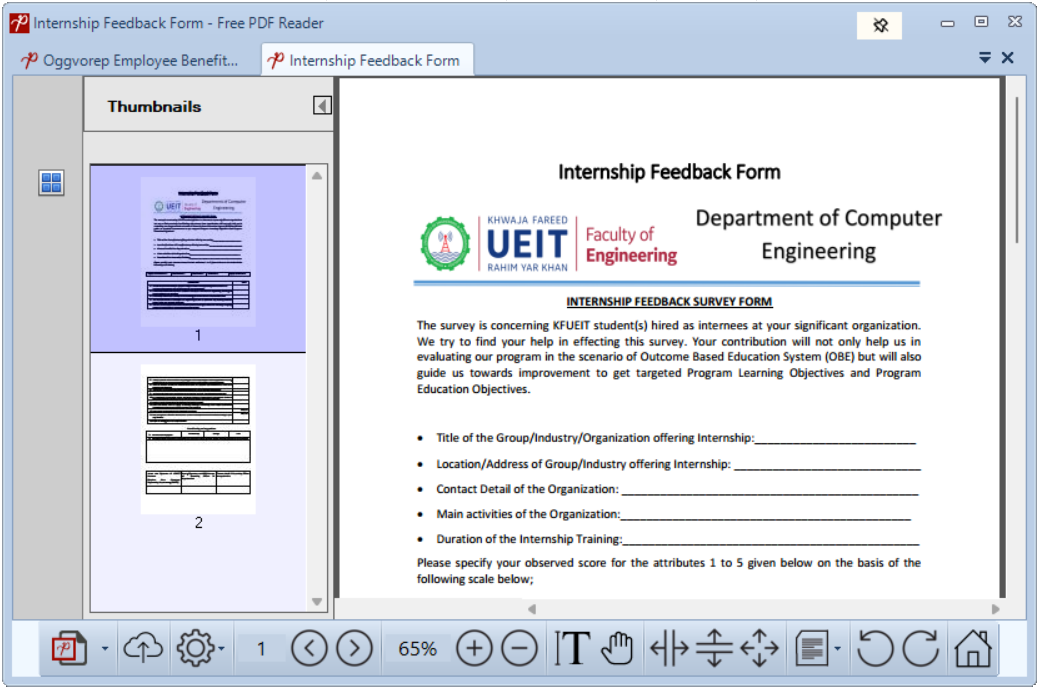
MultiTab Interface
Open several documents at once and move between them without losing your place.
Read, search, print and organize PDF documents with a fast, focused Windows app.

PDF Reader keeps common document jobs close at hand, from comfortable reading to practical conversion and security tools.
Open several documents at once and move between them without losing your place.
Clear rendering, page thumbnails and familiar controls make everyday reading effortless.
Turn PDF content into editable Word documents in a guided workflow.
Export full documents or selected pages as crisp, numbered images.
Extract readable text for reuse, search and accessibility workflows.
Separate pages into new files or combine multiple documents in the order you choose.
Select and copy the content you need with natural mouse controls.
Save embedded images directly instead of taking repetitive screenshots.
Protect documents with a password or remove protection when you have permission.
Count words across multiple PDF documents and review the result in one report.
Get ongoing product improvements and compatibility fixes.
Tune the reading experience to the way you work.
Use familiar tabs, focused controls and quick tools to spend less time navigating the app and more time reading.
Read the user guide →
Choose the plan that fits how often you work with PDFs.
Free Plan
Version 5.3
Yearly Plan
Lifetime Plan
PDF-to-Word conversion quality depends on the source file.
Send a message and our team will get back to you during business hours.
These original screenshots remain available for documentation continuity and existing search links.